

Understanding Your Needs: What to Look for in a YouTube Camera
When embarking on your YouTube journey, selecting the right video camera is essential for producing engaging and high-quality content. Several factors should be considered to ensure that the chosen camera aligns with your specific requirements as a beginner YouTuber.
First and foremost, video resolution plays a critical role in the overall quality of your content. For most entry-level creators, a video camera that supports 1080p resolution will suffice. However, investing in a model that offers 4K capabilities can future-proof your content, as the demand for higher resolution continues to increase across platforms like YouTube, Twitch, and Kick.
The sensor size in your video camera can significantly influence image quality. Larger sensors typically perform better in low-light conditions and provide more depth of field, enhancing the aesthetic appeal of your videos. It is advisable to choose a camera with an appropriately sized sensor that fits your filming environment and style.
Another factor to consider is audio quality, which is often overlooked by beginner content creators. Built-in microphones may not provide satisfactory sound quality, so look for cameras that offer external microphone options. This feature will allow you to connect high-quality microphones for clearer audio, elevating your overall production value.
Image stabilization is also crucial, particularly for handheld shooting. Cameras equipped with optical or electronic stabilization systems will help reduce shakiness, resulting in smoother footage. Additionally, an effective autofocus system can greatly enhance your content creation efficiency, ensuring that your subject remains in focus, especially during dynamic shots.
Lastly, the ease of use should not be underestimated. Opt for a video camera with an intuitive interface and user-friendly settings. A camera that allows you to develop your skills without overwhelming you with complexity will be beneficial as you embark on your YouTube journey.
Top 5 Recommended Cameras for Beginner YouTubers
For aspiring content creators venturing into platforms like YouTube, Twitch, or Kick, selecting the right video camera is crucial to ensure quality and a positive viewing experience. Below are the top five recommended cameras tailored for beginner YouTubers, highlighting their key specifications, advantages, and drawbacks.
1. Canon EOS M50 Mark II
This mirrorless camera is cherished for its versatility. With a 24.1 megapixel APS-C sensor, the M50 Mark II supports 4K video recording in a compact design. Its vari-angle touchscreen is excellent for vlogging, providing flexibility in framing.
Budget: $1379 AUD
Advantages: Excellent autofocus and user-friendly interface.
Drawbacks: Limited 4K recording capabilities.
Rating: 8/10

- 24.1 megapixel (aps-c) cmos sensor with iso 100-25600 (h: 51200).
- digic 8 image processor with auto lighting optimizer.
- improved dual pixel cmos af and eye detection af (still/movie servo af support).
2. Sony ZV-1
Specifically designed for vlogging, the Sony ZV-1 comes equipped with a 20.1 megapixel sensor and an impressive fast autofocus system. Its built-in ND filter allows for cinematic shots even in bright light, making it a great option for various shooting conditions.
Budget: $1690 AUD
Advantages: Compact size and excellent audio capture.
Drawbacks: Limited optical zoom range.
Rating: 9/10
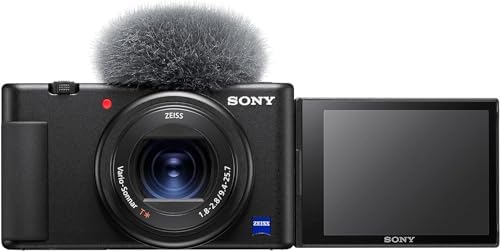
- CINEMATIC VIDEOS AND STUNNING PHOTOS: Capture high-quality 4K videos and 20.1MP photos with a large 1-inch sensor and a …
3. Panasonic Lumix G7
This mirrorless camera offers 16 megapixels and 4K video capabilities. The interchangeable lenses give beginners the flexibility to switch based on their content type, making it adaptable.
Budget: $1200 AUD
Advantages: Good image quality and affordable lenses.
Drawbacks: The battery life may be limited.
Rating: 7/10
4. Logitech Brio 4K
Ideal for streaming on platforms like Twitch, this webcam provides 1080p video quality with excellent autofocus. It’s simple to use, catering perfectly to those entering content creation.
Budget: $208 AUD
Advantages: Easy setup and good for live streaming.
Drawbacks: Limited to desktop use.
Rating: 6/10

- For an ideal head and shoulders shot
- Right light 3 automatically adjusts exposure
- Compatible with popular video
5. GoPro HERO12 Black Waterproof Action Camera
A favorite among adventure enthusiasts, this action camera offers 27 megapixels, 5.3K video recording, and rugged durability. It is designed for those who enjoy dynamic content creation.
Budget: $514
Advantages: Great stabilization and waterproof design.
Drawbacks: Limited low-light performance.
Rating: 9/10

- High Dynamic Range Video + Photo: HERO12 Black takes its best-in-class image quality to the next level with HDR for both…
- Unbelieveable Image Quality: With 5.3K video that gives you 91% more resolution than 4K and an incredible 665% more than…
- Emmy Award- Winning HyperSmooth 6.0 Stabilization: HyperSmooth continues to set the bar for insanely smooth footage and …
Comparative Analysis: Budget-Friendly vs. Premium Cameras
When embarking on a content creation journey, particularly for platforms such as YouTube, Twitch, or Kick, aspiring creators often face the dilemma of choosing between budget-friendly and premium video camera options. Each category has its advantages and limitations, which can ultimately influence the quality of content produced.
Budget-friendly cameras are ideal for beginners who are just starting. These models offer an affordable entry point, allowing new creators to experiment with different styles of filming without a significant financial commitment. For instance, a camera priced under $500 can still deliver decent video quality, making it suitable for vlogs, tutorials, or gameplay broadcasts. Additionally, the ease of use of these cameras permits individuals to learn the basics of video shooting and editing, laying the groundwork for future projects.
On the other hand, premium video cameras cater to those who may be more serious about their content creation endeavors. These cameras often incorporate advanced features, such as higher resolution sensors, better low-light performance, and superior audio capture capabilities. Such investments can lead to higher production value, which is crucial in attracting and retaining an audience on platforms like YouTube. For creators aiming to build a brand or a following, investing in a higher-end camera might be justified, especially if they plan to produce regular and high-quality content over an extended period.
Factors such as longevity and return on investment also play significant roles in this decision-making process. While budget-friendly options provide immediate access to video creation, premium models can offer longer-lasting solutions that might save money in the long run due to better reliability and quality. Hence, understanding personal goals in content creation is crucial when determining the right camera for one’s needs.
Additional Tips for Getting Started on YouTube Beyond the Camera
While selecting the right video camera is crucial, factors such as lighting, audio quality, and overall setup significantly influence the final output. To enhance your YouTube videos, it is advisable to invest in affordable lighting solutions. Natural light can be an excellent starting point, so consider shooting during the day in well-lit environments. However, investing in softbox lights or LED panels can dramatically improve the quality of your visuals, allowing for a more polished look even in low-light settings.
Audio quality is another critical consideration. Viewers are often more forgiving of a less-than-perfect video quality than they are of poor sound. A basic external microphone, such as a lavalier or shotgun mic, can significantly enhance your audio clarity. Brands like Rode and Boya offer budget-friendly options that are highly rated among content creators on platforms like YouTube and Twitch.
As for your setup, ensure the background is tidy and relevant to your content. Consider using a backdrop or a plain, aesthetic wall to minimize distractions. You may also want to use simple props related to your niche to create visual interest. For editing purposes, numerous free software options, such as DaVinci Resolve and Shotcut, allow for robust editing capabilities without requiring a major financial investment. Basic editing skills can help you cut unnecessary parts, add engaging graphics, and refine the overall pacing of your content.
In your early endeavors on platforms like Kick, YouTube, or Twitch, prioritizing these elements can help maximize the quality of your content and draw in an audience, irrespective of which video camera you choose. Stay committed to improving your skills, and remember that both practice and feedback are essential to your growth as a content creator.